For people who ship to more than one store
Know what's blocking your release before the store does.
The code is done. Then the Mac build is rejected over notarization, the Play listing wants a verified identity, and the winget manifest is two versions behind. ReleaseGreen keeps one checklist per app for all of it, with a light on every line and the steps to fix whatever isn't green.
- Apple Developer Program membership is active and renews on timeRenews 14 Mar 2027
- Play Console developer identity verified
- Latest Program License Agreement acceptedLast confirmed 97 days ago. Re-check due.
- Homebrew: published and up to dateFormula is on 2.3.0, latest release is 2.4.1. Fix: open the version-bump PR.
- Paid Apps Agreement: banking and tax forms completeNot started
How it works
Add an app and say where it ships.
Pick from App Store, Mac App Store, Google Play, Microsoft Store, Homebrew, winget, Flathub and the rest. You get only the checks that apply to those targets.
Work down the list.
Some lines turn green by themselves: we look up the public registries, your site's legal pages and your GitHub releases. The rest you tick off, and anything that expires (agreements, certificates) goes amber on a date.
Get told before it hurts.
A digest when something turns amber or red, and a fix-it checklist for each red line. Not a dashboard you have to remember to open.
What it checks
83 checks across 18 places you can ship.
Accounts and agreements, signing and notarization, package-manager manifests, store listing requirements, and the legal pages that reviewers look for. Every check has a severity (blocker, important or advisory), fix-it steps, a source link, and the date we last reviewed it against the vendor's documentation.
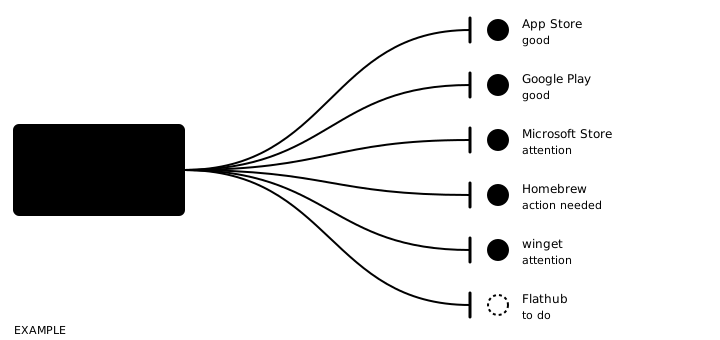
Where a rule comes from reputable reporting or experience rather than official docs, the check says so, and says when rules are still in flux. You are not asked to trust a bare red light.
- iOS and iPadOS (App Store)
- macOS, Mac App Store
- macOS, direct download (Developer ID)
- Android, Google Play
- Android, F-Droid
- Android, direct APK
- Windows, Microsoft Store
- Windows, direct download
- winget
- Chocolatey
- Scoop
- Homebrew
- Flathub
- Snap Store
- Arch User Repository
- Your own apt, rpm, PPA or COPR
- AppImage
- GitHub Releases
Private repositories
A new release turns the lights on its own.
Install the ReleaseGreen GitHub App on the repositories you choose. When you publish a release, the checks that depend on it (is the Homebrew formula current, is the winget manifest up to date) re-run without anyone opening the app.
The app asks for read access to repository contents and nothing else. Tokens are created per repository, held in memory for the length of one check and never stored. The details are on the security page.
Pricing
- 14-day free trial with up to 3 apps. No card needed.
- One price after that. Every check, every distribution target, the GitHub release watching and the digests.
- You pay for the apps you track. Remove an app and the charge stops.
- Billed through Stripe. Change or cancel in Stripe's customer portal, no email required.
- Team members are not charged separately.
Questions
Does it submit anything to the stores for me?
No. It tells you what is missing or wrong and how to fix it. It does not hold your store logins or upload builds.
Do I give it my signing keys?
No, and it refuses them. It only accepts public certificates and fingerprints. If you paste a private key it is rejected, not stored.
How do you keep the checks right when the stores change their rules?
Each check carries a review date and a confidence level. We re-review the catalog on a schedule and the changes are dated. Rules that are still moving are flagged as such. We will sometimes be behind a store's latest change, which is why each line links to the source so you can look for yourself.
Where is my data kept?
In Google Cloud, in Belgium (europe-west1). Free-text fields you enter are encrypted per organization with keys that live in Google Cloud KMS. See security for what is and isn't covered.
Is this a replacement for App Store review guidelines, or a lawyer?
No. It is a checklist of the account, signing and packaging steps that sit outside your code. It is not legal advice and does not predict review outcomes.